Selecting and Opening a Form
Description
This example provides a script that you can place under the OnPush event of a button on a form. It displays a list of other forms in your database. After you select another form and click OK, the script closes the current form and opens the selected form.
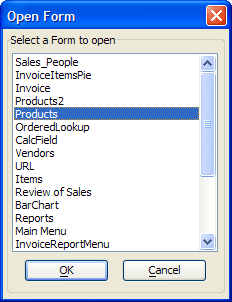
dim SHARED a_forms[100] as C
dim SHARED varC_result as C
dim form_list as C
dim ok_button_label as C
dim cancel_button_label as C
form_list = a5.Form_Enum(2)
a_forms.initialize(form_list)
ok_button_label = "&OK"
cancel_button_label = "&Cancel"
varC_result = ui_dlg_box("Open Form",<<%dlg%
{frame=1,2:Select a Form to open}
{sp=.5}
{lf=1}
{region}
[.40,15formlist^#a_forms!select_form];
{endregion};
{region}
{lf}{justify=center}
<*15=ok_button_label!OK> <15=cancel_button_label!CANCEL>
{endregion};
%dlg%,<<%code%
if a_dlg_button="select_form" then
    a_dlg_button=""
end if
%code%)
if varc_result = "OK" .and. formlist <> "" then
    frmname = parentform.Name()
    eval(frmname+".close()")
    form.view(formlist)
end if
See Also